

My daughter Mia turned five in January, and she had been asking for a tablet since the previous summer. I was not ready to hand her a Fire tablet and watch YouTube consume her entire childhood, so I did what any teacher-parent hybrid does: I spent three weeks reading reviews before making a decision. I landed on the LeapFrog LeapPad Academy, and we have been living with it daily for five months now. I want to give you the honest report I could not find anywhere else, from someone who teaches second grade by day and referees screen-time arguments by night.
The short version: the LeapPad Academy genuinely teaches phonics and early math in a way that held Mia's attention far longer than I expected. It is not without real frustrations, and at its current price it is not a trivial purchase for most families. But after five months of daily fifteen-to-twenty-minute sessions, Mia moved from recognizing about half the alphabet to reading simple three-letter words on her own. That result matters to me as both her mother and as a teacher.
The Quick Verdict
A genuinely educational kids tablet with age-locked content and real phonics depth. Best for ages 3 to 7 whose parents want structured learning rather than open-ended screen time.
Amazon Check Today's Price →Your child is already asking for screen time. Make it count.
The LeapFrog LeapPad Academy gives kids ages 3 to 7 a walled garden of actual curriculum, not YouTube rabbit holes. Check the current price on Amazon before the next meltdown.
Amazon Check Today's Price on Amazon →How I've Used It: Five Months With Mia, Plus My Classroom Lens
We set a simple rule from day one: the LeapPad lives on the kitchen counter, not in a bedroom, and sessions happen before anything else. Every weekday morning while I made breakfast, Mia would climb into her chair, turn it on, and start a session. Weekend sessions happened after our outdoor time, usually a walk with the cats around the block or a short hike at the preserve nearby. That structure mattered. Having the LeapPad tied to a routine, rather than handed over on demand, made it feel like a school tool rather than a reward.
I also brought the LeapPad into my classroom twice, letting a few of my lower-performing second graders use it during free-choice Friday to see how they interacted with the reading apps compared to my five-year-old. That context shaped a lot of what I will say about content depth below. Kids who already read basic CVC words found the letter-tracing activities too easy and got bored quickly. But kids who were still building phoneme awareness found the same activities genuinely engaging. The LeapPad is tuned for the pre-K through early kindergarten window, and it knows that.
One practical note: I downloaded four of the free built-in apps immediately and purchased two additional apps from the LeapFrog App Center within the first week. The free content is enough to get started, but if your child is engaged, you will likely want to add apps within the first month.
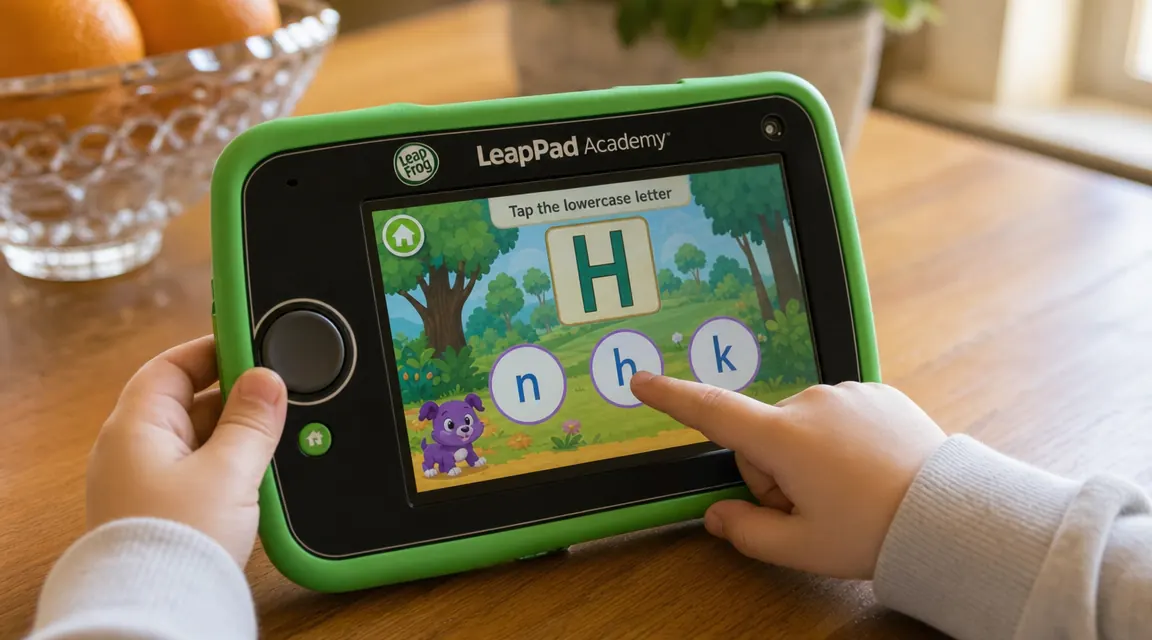
What the App Library Actually Looks Like
The LeapPad Academy runs on LeapFrog's proprietary operating system, which means the only apps available are those sold or offered free through LeapFrog's own App Center. That is both its biggest strength and its clearest limitation. On the strength side: every app on the platform has been filtered for age-appropriateness. There is no algorithm surfacing violent content, no ads, no in-app purchases that slip past a five-year-old. On the limitation side: the library is finite. As of this spring, the App Center has around 800 apps and games. That sounds like a lot until your child has found her ten favorites and you realize that the newest content was released a few years ago.
The apps I found most effective for Mia were Letter Factory (phonics, absolutely worth it), Writing Wizard (letter formation, she still asks for this one), and the included Learn to Read at the Farm app, which walks kids through simple word families in a game format. The apps that felt thin were the ones built around licensed characters. They often prioritized entertainment over actual skill-building, and Mia moved on from them quickly. I generally steered her toward the LeapFrog-developed curriculum apps rather than the licensed ones.
One feature I use constantly as a parent is the Learning Path. The tablet tracks which activities Mia completes and logs her progress, then suggests next steps. After five months, I can pull up a summary that shows her time spent, skills touched, and areas where she needs more practice. As a teacher, I find this genuinely useful. It is not as detailed as an IEP progress report, but for a preschool-age learner at home, it is a meaningful data point.
Build Quality and Durability Over Five Months
The LeapPad Academy has a rubberized bumper frame around the screen that absorbs minor drops reasonably well. Mia dropped it from the kitchen table onto tile once in February and from the couch onto hardwood twice after that. No cracks, no dead pixels. The screen itself is a 7-inch touch display with resolution that looks acceptable but not sharp by modern tablet standards. Text is legible at the intended viewing distance, and the bright colors in the apps read clearly.
Battery life is solid. A full charge gets Mia through roughly four days of her 15-to-20-minute daily sessions. We charge it on Sunday nights and forget about it the rest of the week. The charging port is micro-USB, which is slightly annoying in a USB-C world, but we had cables already so it was not a dealbreaker.
The stylus that comes with the unit is small and easy for little hands to hold. Mia uses it almost exclusively for the writing apps. My one durability concern: the stylus tether feels flimsy, and I would not be surprised if a more active kid loses it within a few months. I recommend clipping it somewhere secure or buying a spare.
After five months of daily sessions, Mia went from recognizing about half the alphabet to reading simple three-letter words on her own. That result is not nothing.
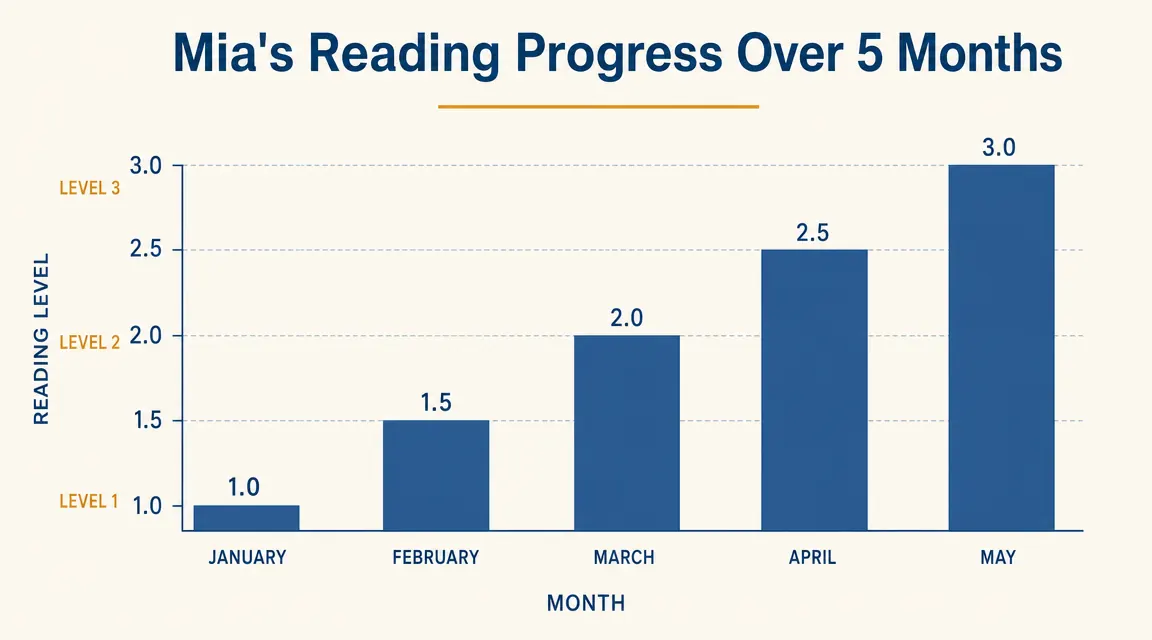
Learning Results After Five Months: What Actually Changed
I track Mia's literacy informally the same way I track my students: through regular short observation sessions where I ask her to identify letters, blend sounds, and read simple word cards. In January, she could confidently name about 13 capital letters and zero lowercase letters. By the end of May, she names all 26 capitals, 22 lowercase letters, can blend short vowel CVC words like cat, hot, and run, and can write her name plus about eight other words from memory.
I cannot attribute all of that to the LeapPad alone. We read together every night, and she attends a pre-K program two mornings a week. But the LeapPad filled a gap I genuinely did not have time to fill myself: structured daily phonics practice in a format she chose to engage with. She did not need to be reminded to use it. That self-motivation piece is real.
On the math side, Mia has moved from reliably counting to ten to counting to thirty with no errors, and she can identify basic shapes and patterns. The math apps are less polished than the reading apps in my opinion, and I supplemented those with her pre-K workbook pages. But the number recognition and counting games held her attention well enough to be useful.
The Real Tradeoffs: What the LeapPad Does Not Do Well
The LeapPad Academy is not a general-purpose tablet, and it is not trying to be. But a few limitations are worth naming clearly before you buy.
First, the content ceiling is real. If your child is already reading at a late-kindergarten or first-grade level, they will outgrow the available apps within six months. The platform does not grow with strong readers the way a general tablet loaded with reading apps like Raz-Kids or Epic can. I have already started thinking about how long the LeapPad will stay relevant for Mia.
Second, the camera is poor. The LeapPad Academy has a front and rear camera, and Mia loves taking pictures, but the image quality is very low. This is a minor complaint for most parents but worth noting if your child gets excited about photography or video.
Third, the WiFi connectivity is limited by design. The tablet connects to WiFi mainly to download new apps and sync the Learning Path. It does not have a browser, and kids cannot surf to outside content. Most parents will consider this a feature. I mention it because some parents expect to stream content or access YouTube Kids through it, and that is not how this device works.
Fourth, the App Center pricing adds up. The base tablet gets you going, but if you want depth in any content area, plan to spend on additional apps. A good set of five to eight targeted apps could run an additional $20 to $40 on top of the tablet's current price.
What I Liked
- Content is completely locked to age-appropriate material, no algorithm creep
- Learning Path tracking gives parents a real picture of skill development
- Durable build with rubberized bumper survives normal toddler drops
- Letter Factory and Writing Wizard apps are genuinely effective for phonics
- Self-directed use: Mia asked to use it without prompting almost every morning
- No ads anywhere on the device
Where It Falls Short
- Content ceiling is real: strong pre-readers may outgrow the platform by age 6 to 7
- App library has not grown substantially in recent years
- Camera quality is very low
- Additional apps cost extra and can add up quickly
- Micro-USB charging is slightly outdated
- Stylus tether feels fragile on the included unit

Alternatives I Considered and Why I Still Chose the LeapPad
Before buying, I seriously considered the Amazon Fire HD 8 Kids. It is comparably priced, runs full Android with Kids+ subscription, and has a much larger content library. What stopped me: Amazon Kids+ includes YouTube Kids and a browser, and while parental controls are solid, the environment is still designed to maximize engagement time rather than direct a child toward specific skills. For a four or five year old who is not yet reading, I wanted a platform built around curriculum, not entertainment. The LeapPad's walled garden is a deliberate design choice, and for this developmental window, I believe it is the right one.
I also looked at the VTech InnoTab, which is a similar concept at a lower price. The InnoTab's app library felt even thinner to me, and the learning tracking is less detailed. If budget is the primary driver, it is worth a look. But if you are spending serious money on a learning tool, the LeapPad's ecosystem depth and curriculum alignment give it the edge.
Who This Is For
The LeapFrog LeapPad Academy is the right pick for parents of children ages 3 to 6 who want a dedicated learning tool rather than a general tablet. If you have a child who is curious about letters and numbers, easily distracted by open-ended apps, and young enough that the content ceiling is a few years away, this device will earn its price many times over. It is also a strong choice for grandparents buying a meaningful gift, teachers setting up a classroom station, or parents who feel uncertain about giving young children access to the open internet.
Who Should Skip It
If your child is already reading simple books, the LeapPad will feel thin within a few months. A 7 or 8 year old who reads independently will not find enough challenge here. Similarly, if your child has already had open internet access on a general tablet and is accustomed to YouTube or gaming, the LeapPad's closed environment may feel like a step down. And if your budget is very tight, the combination of tablet cost plus additional apps is a real consideration worth thinking through before you commit.
Five months in, Mia still picks it up every morning without being asked.
For a pre-K or kindergarten-age child, the LeapFrog LeapPad Academy offers something most tablets do not: a focused learning environment with no ads, no rabbit holes, and real phonics content that works. See the current price on Amazon before you decide.
Amazon Check Today's Price on Amazon →